
Close Menu
    Trending
    • Sky USDC swap reserve fell as holders swapped over $2 billion
    • Bitcoin Faces 6-Year Moving Average Test Only Seen During FTX Collapse
    • Change This Roku TV Setting To Watch Movies How They Were Filmed
    • Why tiny cars are taking off across Europe
    • When Gratitude Feels Like One More Thing You’re Failing At
    • Nottinghamshire sign England bowler Ollie Robinson
    • A Steelers Shocker: Aaron Rodgers Benched By Pittsburgh, Will Be Inactive vs. Broncos
    • Arsenal Champions League fixtures, games, results, squad, standings and schedule 2026/27
    FreshUsNews
    • Home
    • World News
    • Latest News
      • World Economy
      • Opinions
    • Politics
    • Crypto
      • Blockchain
      • Ethereum
    • US News
    • Sports
      • Sports Trends
      • eSports
      • Cricket
      • Formula 1
      • NBA
      • Football
    • More
      • Finance
      • Health
      • Mindful Wellness
      • Weight Loss
      • Tech
      • Tech Analysis
      • Tech Updates
    FreshUsNews
    Home » How To Enable Live Activities On iPhone And CarPlay
    Tech Updates

    How To Enable Live Activities On iPhone And CarPlay

    FreshUsNewsBy FreshUsNewsOctober 11, 2026No Comments3 Mins Read
    Share Facebook Twitter Pinterest LinkedIn Tumblr Reddit Telegram Email
    Share
    Facebook Twitter LinkedIn Pinterest Email


    Hold monitor of essential updates with out having to open the app each two minutes.


    Adnan Ahmed for Engadget

    At a time when most Android telephones had already switched to tiny hole-punch cutouts to accommodate their front-facing cameras, the iPhone 14 Professional launched with an extended pill-shaped cutout. Apple has used this as its normal since then, other than the funds “e” telephones and iPhone Duo, and even made it smaller for the iPhone 18 Pro series.

    It’s because iPhones pack greater than only a digicam contained in the cutout; there are further sensors required for Face ID to work. As a substitute of hiding the capsule with cleverly designed wallpapers, Apple leaned into it with the Dynamic Island, utilizing the encircling space to show an in any other case awkward design constraint right into a helpful a part of the iOS expertise.

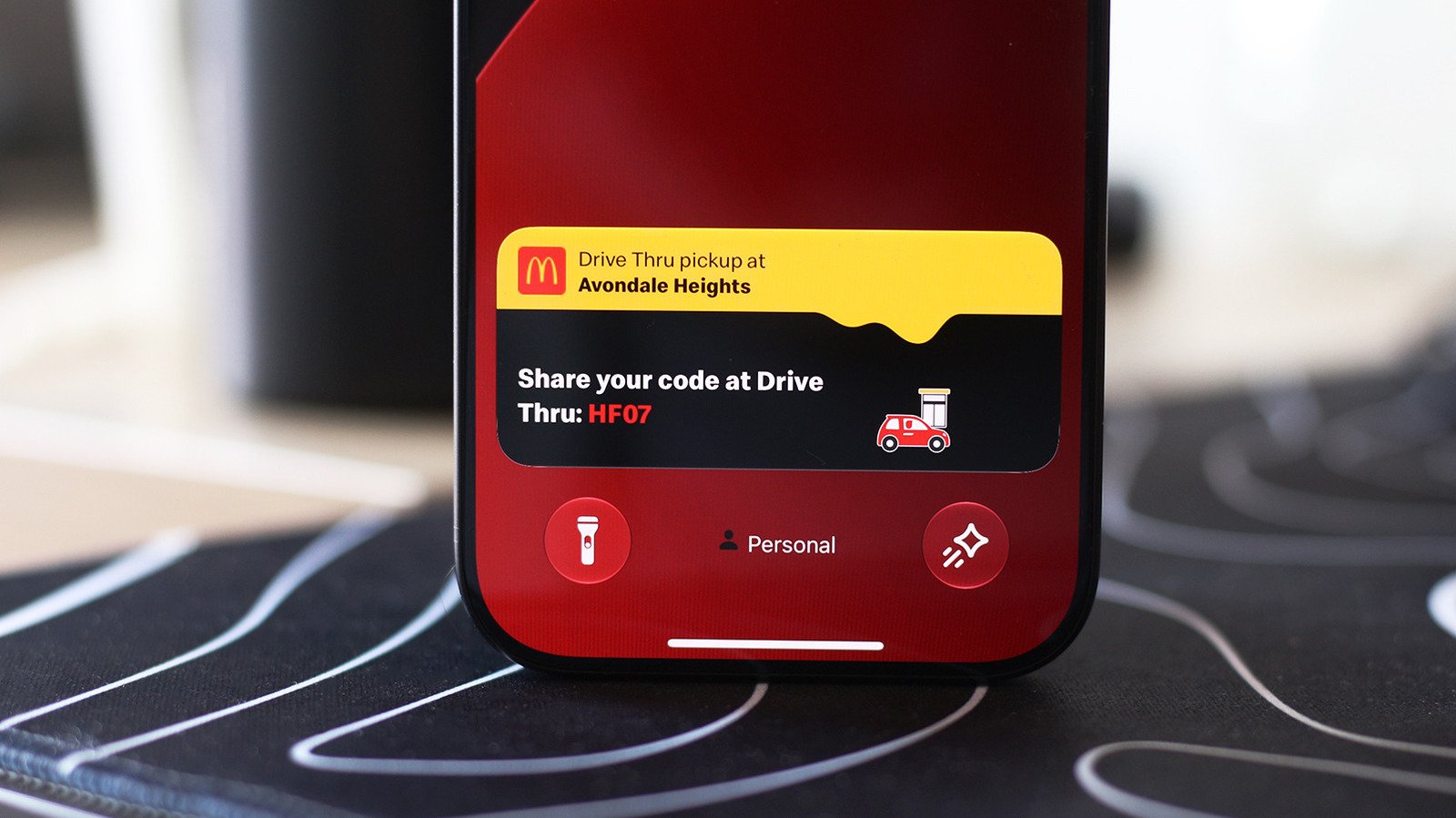
    Your iPhone’s Dwell Actions present up on the Dynamic Island when utilizing your telephone. They show data you would possibly wish to control with out having to continually change again to the related app: timers, navigation instructions, music playback and sports activities scores will be displayed as Dwell Actions. Many third-party apps like meals supply and flight monitoring companies have additionally tailored to make use of the Dynamic Island.

    Dwell Actions ought to be enabled by default, however when you do not see them for sure apps, verify in the event that they’ve unintentionally been turned off. In your iPhone, navigate to Settings > Apps and choose any app that is been supplying you with bother. Make certain the Dwell Actions slider is enabled. Although Dwell Actions work independently of standard notifications, you would possibly wish to additionally allow notifications for the app when you’re not seeing the anticipated updates.

    These actions may even seem on the Lock display screen if you’re not utilizing your machine. To verify that is enabled, go to Settings > Face ID & Passcode. Verify your passcode, then scroll right down to the Permit Entry When Locked part and make sure Dwell Actions is on.

    Utilizing Dwell Actions on CarPlay
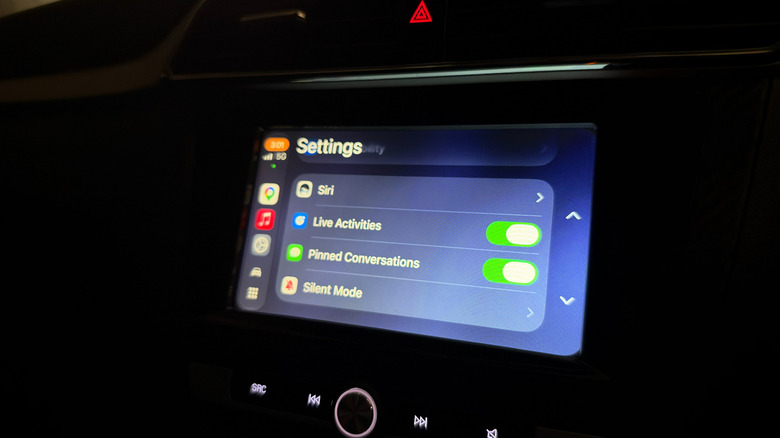

    The Live Activities toggle in CarPlay.
    Adnan Ahmed for Engadget

    CarPlay makes it simple to entry important information out of your iPhone with out getting too distracted whereas driving. As a part of this, it will possibly show Dwell Actions so you possibly can monitor the standing of a meals supply or updates for an upcoming flight. 

    Dwell Actions out of your iPhone are mechanically displayed on the CarPlay Dashboard, the split-screen view to the left of your app listing. For those who’re utilizing an app that covers the complete display screen, Dwell Actions will nonetheless be proven as notifications on the backside of the show. In the event that they change into too distracting, you possibly can at all times flip the characteristic off in CarPlay or disable Dwell Actions for particular noisy apps, as above.

    In case you are not seeing them, open the Settings app in CarPlay, scroll down and ensure the Dwell Actions toggle is enabled. You must also verify the Solutions in CarPlay (or Solutions in Dashboard) possibility is turned on. In the event that they nonetheless do not seem, attempt turning off Driving Focus if it is operating.

    Apart from this, you possibly can add widgets to CarPlay for fast controls and data from apps with out having to open them. Widgets reside within the leftmost part of the CarPlay Dashboard. Spend just a little extra time within the Settings app, and you may uncover extra methods to customize how CarPlay looks on your car’s display.


    Source link

    Share. Facebook Twitter Pinterest LinkedIn Tumblr Email
    Previous ArticleMaster AI Chip Principles With New IEEE Design Program
    Next Article Here’s How Not To Screw Up Your Bitcoin Privacy
    FreshUsNews
    • Website

    Related Posts

    Tech Updates

    Change This Roku TV Setting To Watch Movies How They Were Filmed

    November 25, 2026
    Tech Updates

    Desperate Gamers Are Trying Bring GTA 6 To PCs And Break Free Of Its 30 Fps Cap

    November 24, 2026
    Tech Updates

    Apple Confirms Ted Lasso Will Return For Season 5

    November 24, 2026
    Add A Comment
    Leave A Reply Cancel Reply

    Top Posts

    UK to refuel Saudi jets to help counter Houthi attacks | Houthis News

    September 22, 2026

    Leaked code shows MetaMask eyeing in-wallet perps via Hyperliquid

    September 21, 2025

    Erica Schwartz confirmed as new CDC chief amid US agency turmoil | Health News

    August 5, 2026

    Report, result, goals as Spurs stumble

    August 7, 2025

    Chiefs Owner Clark Hunt: ‘We’re Making Progress’ on Domed Stadium Renderings

    April 24, 2026
    Categories
    • Bitcoin News
    • Blockchain
    • Cricket
    • eSports
    • Ethereum
    • Finance
    • Football
    • Formula 1
    • Healthy Habits
    • Latest News
    • Mindful Wellness
    • NBA
    • Opinions
    • Politics
    • Sports
    • Sports Trends
    • Tech Analysis
    • Tech News
    • Tech Updates
    • US News
    • Weight Loss
    • World Economy
    • World News
    Most Popular

    Sky USDC swap reserve fell as holders swapped over $2 billion

    November 25, 2026

    Bitcoin Faces 6-Year Moving Average Test Only Seen During FTX Collapse

    November 25, 2026

    Change This Roku TV Setting To Watch Movies How They Were Filmed

    November 25, 2026

    Why tiny cars are taking off across Europe

    November 25, 2026

    When Gratitude Feels Like One More Thing You’re Failing At

    November 25, 2026

    Nottinghamshire sign England bowler Ollie Robinson

    November 25, 2026

    A Steelers Shocker: Aaron Rodgers Benched By Pittsburgh, Will Be Inactive vs. Broncos

    November 25, 2026
    Our Picks

    Back-to-school dinner hacks using rotisserie chicken

    September 30, 2025

    Why the once loyal bazaar merchants are now protesting in Iran | Protests

    January 10, 2026

    You’re just the groundsman – India coach Gautam Gambhir in spat with Oval staff

    July 31, 2025

    Dover, Watkins Glen Moves Will Test NASCAR Risk-Taking

    August 20, 2025

    Expected line-ups, stats and where to watch as European champions meet World Cup favourites

    July 13, 2026

    Ashlee Buzzard in custody after daughter Melodee found dead in Utah: Sources

    December 23, 2025

    North Korea pledges to ‘unconditionally support’ Russia’s war in Ukraine

    July 13, 2025
    Categories
    • Bitcoin News
    • Blockchain
    • Cricket
    • eSports
    • Ethereum
    • Finance
    • Football
    • Formula 1
    • Healthy Habits
    • Latest News
    • Mindful Wellness
    • NBA
    • Opinions
    • Politics
    • Sports
    • Sports Trends
    • Tech Analysis
    • Tech News
    • Tech Updates
    • US News
    • Weight Loss
    • World Economy
    • World News
    • Privacy Policy
    • Disclaimer
    • Terms and Conditions
    • About us
    • Contact us
    Copyright © 2025 Freshusnews.com All Rights Reserved.

    Type above and press Enter to search. Press Esc to cancel.